
Phantom devices
A device that doesn't exist physically: one combined value from devices anywhere in your home.
The temperature of a room with two thermometers, "are any windows open", "is anyone moving upstairs": a phantom is that answer, with a spot of its own on the plan.
 Phantom (Editor)Bigger, inverted, dashed edge; dashed lines to its devices while selected.
On the dashboard card a phantom looks like any other reading or marker: the card doesn't show where a value comes from.
When to use it
| Use a phantom | Not a phantom |
|---|---|
| One reading per room from two sensors | Several devices on one spot → bond |
| "Windows": any open | One device in two places → split device |
| Motion anywhere upstairs |
Make one
- In 3 · Place devices, press the phantom button on the plan (next to Layers). A new, empty phantom appears with its card open.
- Drag devices that are already on the plan onto it: they join and jump straight back to their own spot (they never move).
- With two or more it's ready; move it wherever the value should show.
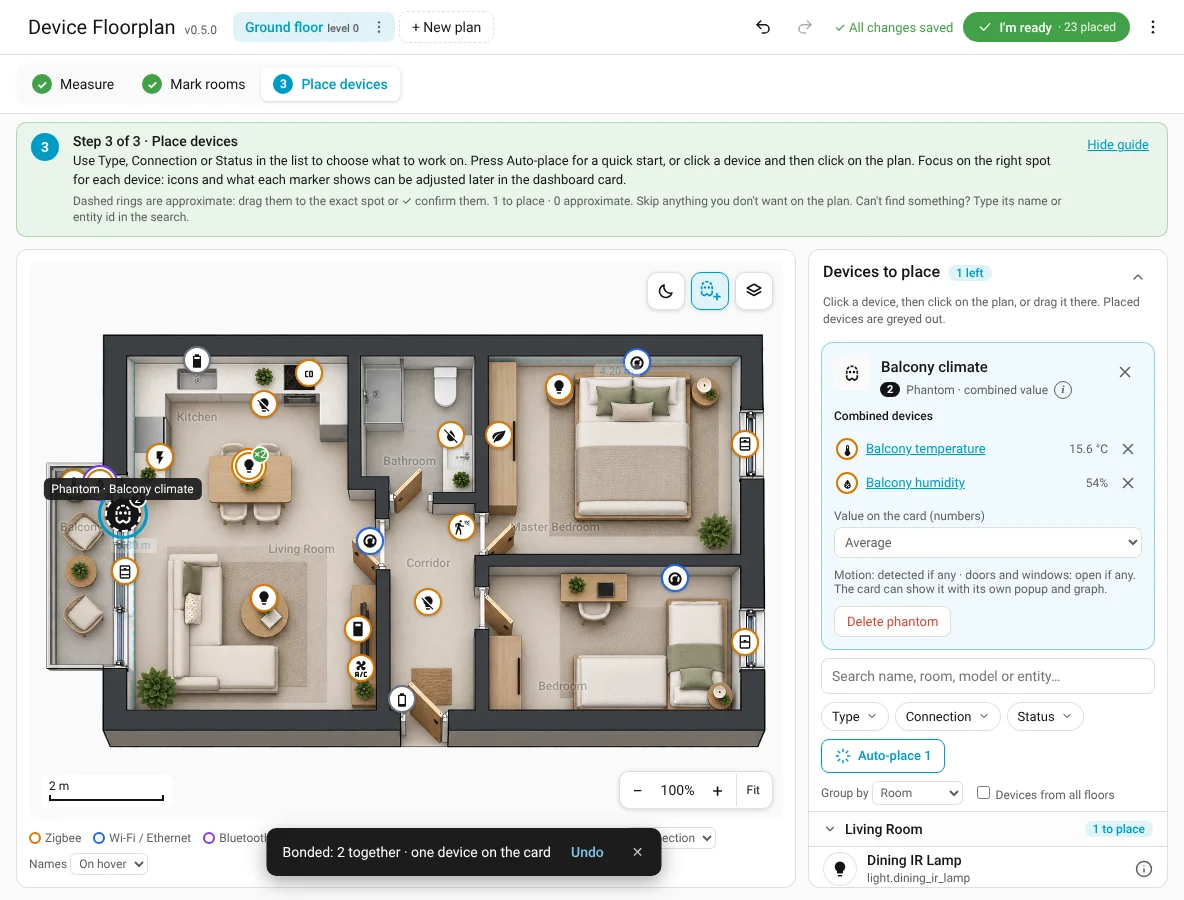
The phantom card: name, Combined devices (✕ takes one out; Uses: All readings ▾ under a member picks which of its sensors count, e.g. only its room temperature), and Value on the card for numbers: average, lowest, highest or one device. Motion is detected if any, doors and windows are open if any (2 open).
On the card
ACs and thermostats count with the temperature and humidity they report themselves (a humidity of 0 is ignored). An extra marker or chip in every overlay where its values fit (Comfort, Security, Live, custom overlays…); its devices keep their own markers. Tap it for a popup with every device's value (and a 24 h graph for readings). No lines are drawn on the card: the popup lists the devices. Show it outside the plan with the chip card.
Examples
- Child's room, two thermometers (window and bed): the phantom shows 20.4° with 💧 71% under it; the popup shows both with a graph, so you see if the window side gets cold.
- Windows: every window contact in one phantom; a chip in the wallpanel's top row shows All closed or 2 open.
- Motion upstairs: all motion sensors upstairs, Detected if any of them is.