Chip card
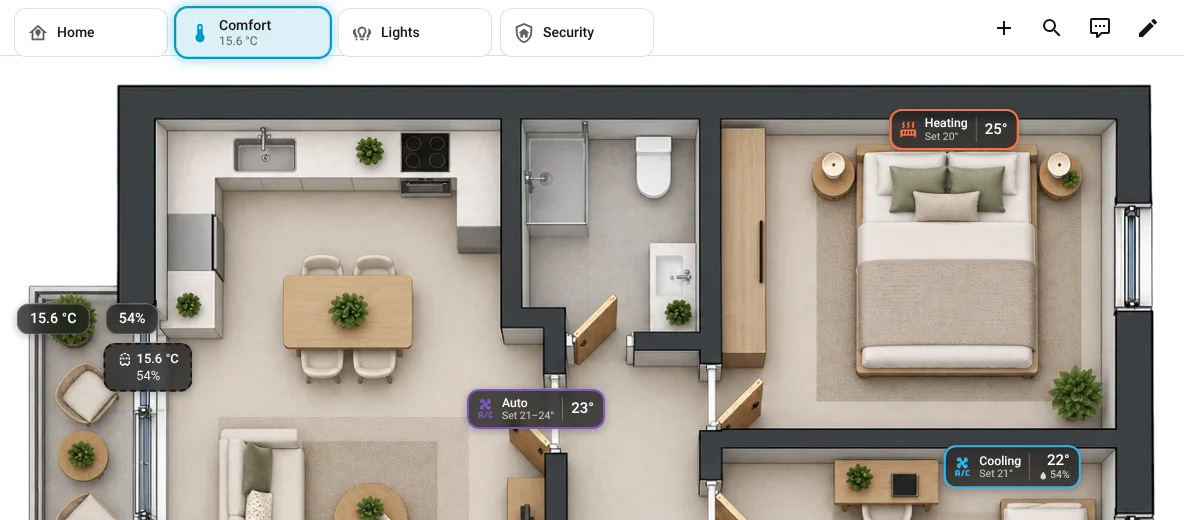
A small companion card for the rest of your dashboard: Device Floorplan chip. Put a row of them above the floorplan (or anywhere on the same screen) and you have a ready-made top bar:
- tapping a chip switches the floorplan card to its overlay,
- the chip of the overlay that is showing glows,
- a chip can show a value: any entity (21.5 °C), a phantom (All closed, 20.4 °C · 71 %) or a bond (2 of 3 on).
Nothing is created in Home Assistant: the chips talk to the floorplan card in the same browser.
Add a chip
In the dashboard's edit mode, Add card → search for Device Floorplan chip. Everything is set in the UI:
| Field | What it does |
|---|---|
| Overlay it opens | plan, live, lights, comfort, security, network, health, people or a custom overlay's ID. The chip glows while this overlay shows. |
| Card ID | The floorplan card's Card ID (card editor → General). Empty = any floorplan card on this screen. |
| Label, Icon | What the chip shows. Empty: the overlay's (or the phantom's) name and icon. |
| Value from an entity | Shown under the label, formatted like Home Assistant does. |
| …or from a phantom | The phantom's combined value. All phantoms of all plans are listed. |
| …or from a bond | The bond's combined value: On, Off, 2 of 3 on, or the average for sensors. All bonds of all plans are listed. |
| Tap | Switch the floorplan (default), open the value's details, switch the bond (all members together), or nothing. |
YAML
type: custom:device-floorplan-chip
overlay: comfort
card_id: hall
label: Comfort
entity: sensor.indoor_temperature   # or: phantom: ground_floor:p1abc · or: bond: ground_floor:b1xyz
# tap: bond                         # with bond: switch all its members together
Use a horizontal stack or a grid for a row of chips. On sections dashboards each chip takes a quarter of a row by default.
Switching from other devices
The chip switches the floorplan on this screen. To switch every screen at once (the wallpanel and your phone), use the action device_floorplan.show_overlay from a button or an automation; the chips follow and glow on every screen. See Switch the overlay from other cards.